To set up Stream4K IPTV on a Formuler box, connect your receiver to the internet, open its built-in MYTVOnline app, find the MAC-ID displayed for its portal connection, and provide that ID to Stream4K for activation. Then add the Stalker/MAC portal URL supplied for your account and connect. The exact menu depends on whether your Formuler uses MYTVOnline 2, 3 or 4.
This guide covers the Stream4K Formuler Z10 and Z11 families in detail, with a shorter section for newer receivers running MYTVOnline 4. Stream4K’s standard service is MAC/Stalker-based, so don’t choose an Xtream Codes or M3U connection unless you have been issued credentials for a different service type.
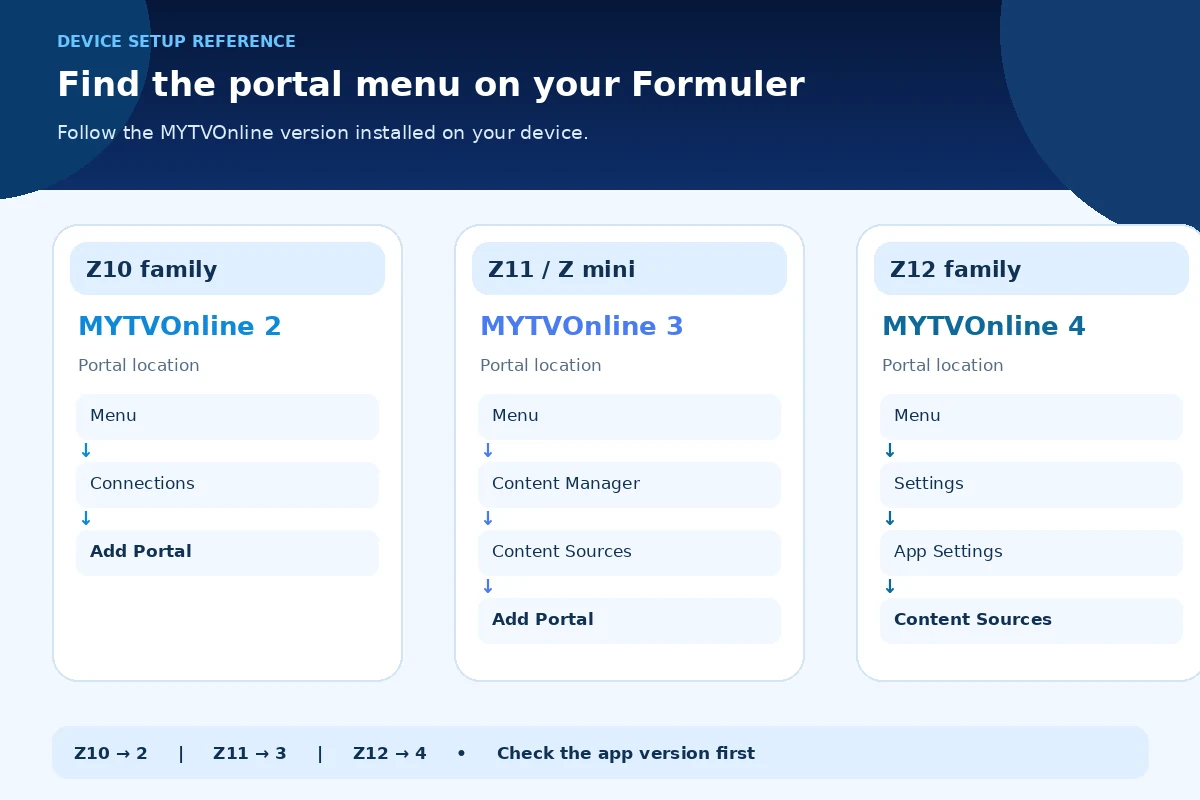
Which MYTVOnline version does your Formuler use?
Find the version in the app name on your home screen. Don’t follow Z11 instructions just because your device runs Android: the MYTVOnline generation determines where its portal settings are located.
| Formuler device family | Usual player | Where to add a Stalker/MAC portal |
|---|---|---|
| Z10, Z10 Pro, Z10 Pro Max, Z10 Neo and Z10 SE | MYTVOnline 2 | Menu → Connections |
| Z11 Pro, Z11 Pro Max and Z mini | MYTVOnline 3 | Menu → Content Manager → Content Sources |
| Z12 family and supported receivers running MYTVOnline 4 | MYTVOnline 4 | Menu → Settings → App Settings → Content Sources |
These paths come from Formuler’s MYTVOnline portal instructions. For the current player associated with each receiver family, see the manufacturer’s model listing. Software updates and product revisions can change menus; follow the version actually installed on your box.
What you need before connecting Stream4K
- A Formuler receiver with its original compatible power supply, an HDMI cable and a working TV input.
- An internet connection through Ethernet or Wi-Fi. Ethernet can remove weak wireless signal as a variable when troubleshooting.
- The MYTVOnline player installed on your receiver. The Formuler setup guides cover the hardware’s initial configuration.
- An approved Stream4K subscription or eligible 48-hour free trial.
- Your receiver’s MAC-ID, followed by the exact Stalker portal URL issued for that registered ID.
A Formuler box does not include a TV subscription. MYTVOnline is a player, while Stream4K supplies the account activation and portal details. Formuler explicitly separates those responsibilities in its official setup explanation.
Step 1: Connect the Formuler box to your TV and internet
- Connect the Formuler box to an available HDMI input on your TV and connect the supplied power adapter.
- Select the matching HDMI input with your TV remote.
- Complete the receiver’s language, date/time and network setup if it is new.
- Open a normal internet-connected app on the Formuler box to confirm the network is working.
- Open the installed MYTVOnline app from the receiver’s home screen.
A connected device can still fail to load an IPTV portal if its service isn’t authorized. The network test only confirms that the box can reach the internet; it doesn’t activate Stream4K.
Step 2: Find the correct Formuler MAC-ID
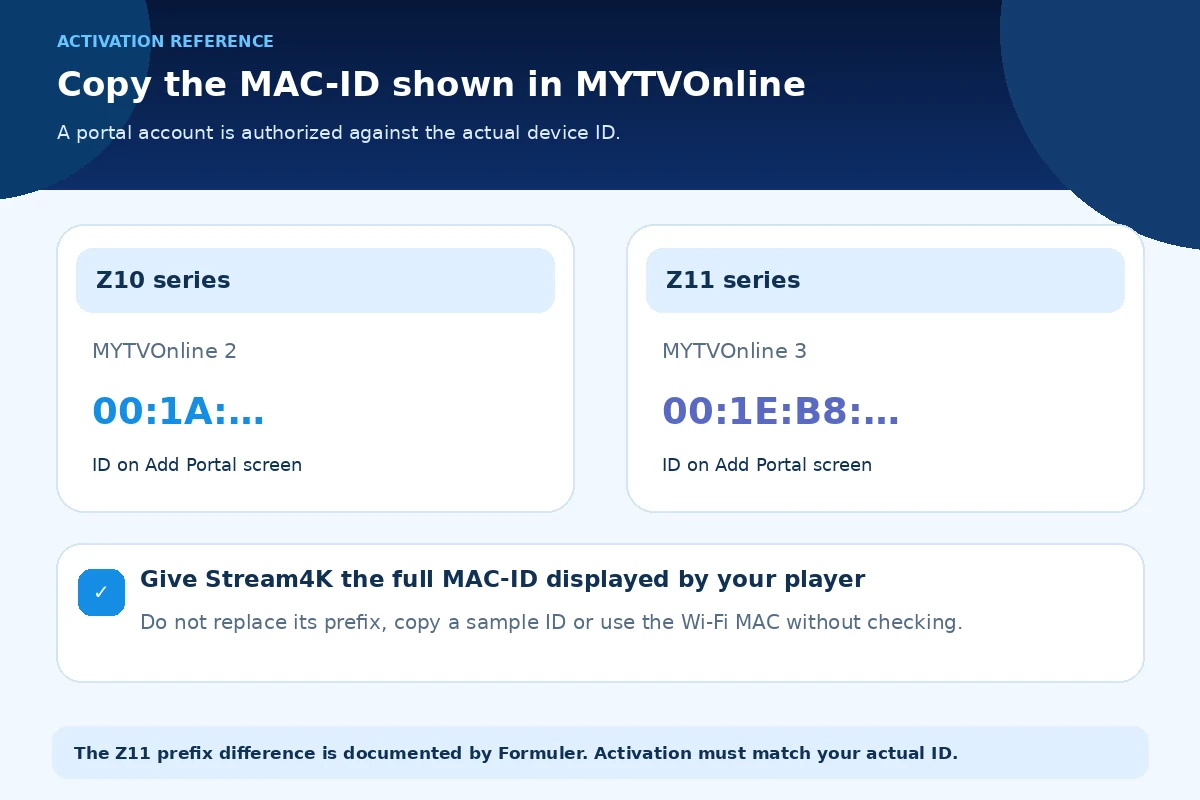
In MYTVOnline, open the portal-add screen for your version (the menu paths above). Look for the MAC-ID or ID shown for that portal connection. Copy the full identifier exactly, including its letters and colons, or take a picture of the screen.
The Z11 exception matters: Formuler introduced a new MAC-ID format with the Z11 series. On MYTVOnline 3, a Z11 identifier may begin 00:1E:B8, rather than the 00:1A… pattern associated with earlier MYTVOnline hardware. Formuler confirms that the Z11 MAC-ID is visible under Content Manager → Content Sources → Add Portal, and on the label attached to the receiver. See Formuler’s Z11 MAC-ID guidance.
Some older activation systems may need a provider-side compatibility check for the Z11 format. Do not manually replace the beginning of the ID or change advanced MAC-ID settings to make it look like an older device. Send the MAC-ID shown by your own receiver and have Stream4K confirm it can be registered.
Which identifier should you send?
| Identifier | Use for Stream4K activation? |
|---|---|
| MAC-ID displayed on MYTVOnline’s Add Portal screen | Yes. This identifies the portal connection being configured. |
| Z11 MAC-ID on the receiver label | Yes, if it matches the ID shown in MYTVOnline 3. |
| Wi-Fi or Ethernet address in Android network settings | Not automatically. It may differ from the portal ID. |
| An example MAC address copied from an online tutorial | No. It will not authorize your device. |
Step 3: Request Stream4K activation and obtain the portal URL
Submit your Formuler model and its actual MAC-ID using the Stream4K order page or the free-trial request form. Stream4K checks eligibility before activating a trial. Wait for confirmation that your MAC-ID is registered, then use the exact Stalker portal URL supplied with your account.
Keep the complete address, including http:// or https://, any port and any path. Do not guess a Stream4K portal URL from a screenshot or another company’s guide. A generic example such as a URL ending in /c illustrates the format; it is not your active portal address. Formuler’s portal guide specifies that a MAC-ID/Stalker connection requires the registered MAC-ID and provider-issued portal URL.
Step 4A: Stream4K Formuler Z10 setup with MYTVOnline 2
Use this route for the Z10 family and other receivers on MYTVOnline 2.
- Open MYTVOnline 2 and press Menu on the Formuler remote.
- Choose Connections.
- Select Add Portal or the add control shown by your installed version.
- Name the connection Stream4K so you can recognize it later.
- Select the MAC-ID / Stalker portal option, where the app provides separate connection types.
- Enter the portal URL sent for the MAC-ID you registered. Keep Login required off for a standard MAC-only Stalker connection; do not invent a username or password.
- Save or select Connect, then allow the player to request the channel list.
This is the relevant MYTVOnline 2 Stalker portal method, not the Xtream Codes login flow. A portal connection may load its guide and categories after authorization, but those features depend on the content included in the activated service.
Step 4B: Formuler Z11 portal setup with MYTVOnline 3
Use this route for the Z11 Pro, Z11 Pro Max and other receivers running MYTVOnline 3.
- Open MYTVOnline 3 and go to Menu → Content Manager → Content Sources.
- Select Add Portal.
- Note the Z11 MAC-ID shown on the add-portal screen and confirm that the same ID was submitted for activation.
- Enter a recognizable portal name, such as Stream4K, if the app offers that field.
- Paste or carefully type the Stream4K portal URL in the URL field.
- For a MAC-only Stalker portal, do not enter an ID/password in login fields. Then select Connect.
- Return to the live TV screen after the source connects and check that channels and guide information load.
Formuler documents the Z11 sequence and its new MAC-ID format in the Z11 support article. If the portal accepts the URL but reports an authentication problem, ask Stream4K to verify that the exact 00:1E:B8… MAC-ID is authorized before changing anything in Advanced Settings.
What about MYTVOnline 4?
MYTVOnline 4 has a different menu path and is associated with newer Formuler models such as the Z12 family; it is not the standard preinstalled player on a Z10 or Z11. On a receiver with MYTVOnline 4, use Menu → Settings → App Settings → Content Sources, add a MAC-ID/Stalker portal, enter your provider-issued URL and connect. The same principle applies: register the MAC-ID shown in your installed player first. The precise path is confirmed by Formuler’s all-version portal guide.
Installing an arbitrary APK called MYTVOnline 4 isn’t a reliable way to upgrade a Z10 or Z11. Follow the receiver’s official software availability rather than assuming all MYTVOnline versions can be installed on any Android box.
Check that the portal is working
Open a category under Live TV, select an available channel, and test normal playback. Also inspect the guide and any movies or series included with your subscription. If categories appear but nothing plays, that is a different symptom from a portal that never connects.
If a previously working playlist is empty or outdated, refresh the content rather than repeatedly deleting the connection. Formuler’s documented refresh paths are:
- MYTVOnline 2: Refresh through the menu settings.
- MYTVOnline 3: Settings → Content Manager → Data Sync → Contents Data → Refresh. Apply the new content when prompted.
- MYTVOnline 4: Menu → Settings → App Settings → Content Sources → Select portal → Refresh Content.
These steps come from the official channel/VOD refresh guide.
Fix common Formuler portal problems
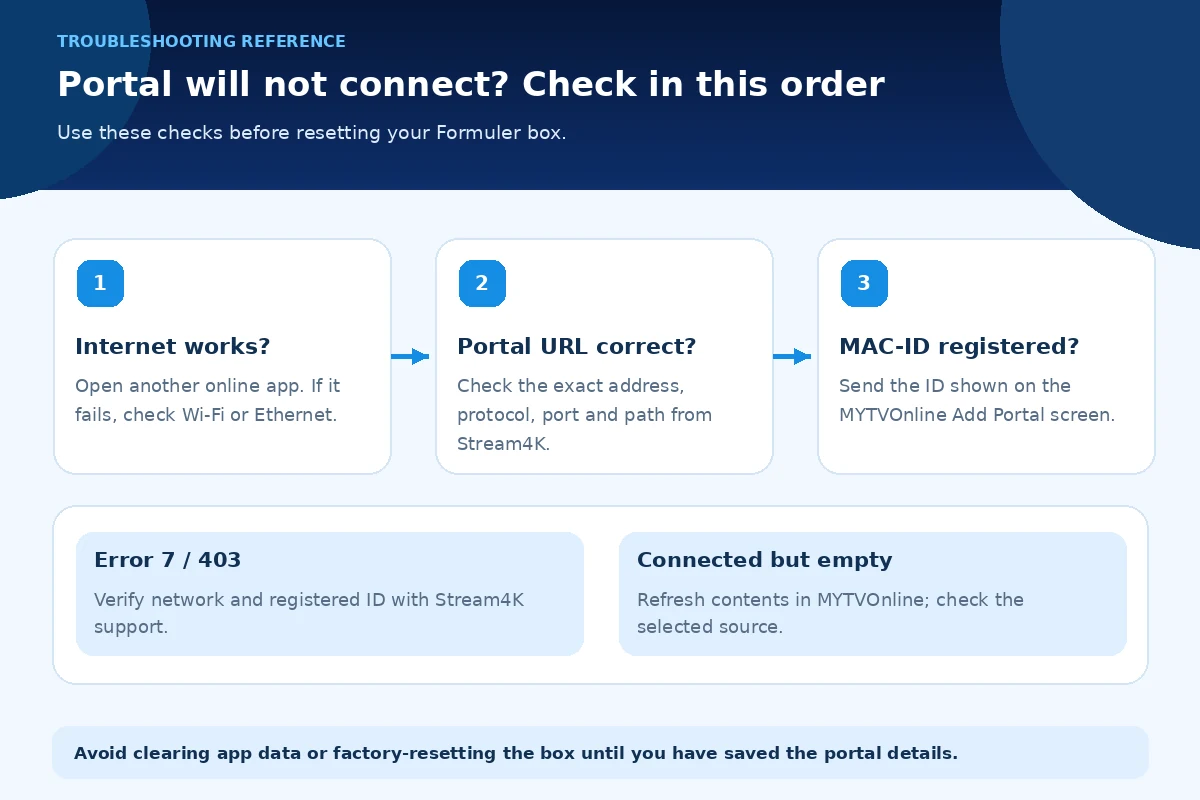
| Symptom | First checks | Next action |
|---|---|---|
| Error code 7 / 403 | Does another internet app work? Is the complete portal URL correct? | Confirm the registered MAC-ID and account status with Stream4K. Formuler associates code 7 with a device-to-service connection failure. |
| Portal keeps loading | Confirm internet access, portal spelling and correct MYTVOnline connection type. | Verify authorization for the exact MAC-ID shown in the current player. |
| Z11 portal rejects the MAC-ID | Compare the ID on MYTVOnline 3’s Add Portal screen against the ID registered with Stream4K. | Request a provider-side compatibility check; do not manually rewrite its prefix. |
| Channels disappeared after connecting | Check whether the source is selected and whether content refresh is available. | Refresh portal content; report any missing channel categories with the date and model. |
| Black screen or buffering | Try another channel, check the connection and reboot the player if needed. | Compare Ethernet versus Wi-Fi and report the channel, time and device if failures persist. |
| TV displays no HDMI signal | Check TV input, HDMI cable and receiver power. | Correct the local display connection before troubleshooting Stream4K authorization. |
For Error 7 and 403, Formuler’s helpdesk recommends checking internet connectivity, the entered portal URL and the registered MAC-ID. Clearing the app’s data or factory-resetting the box can erase saved portal settings, so use those steps only when simpler checks fail and you have your connection details available.
If only certain TV channels buffer, note which ones and when. If the same receiver struggles with normal video apps over the same network, investigate the local internet connection. Neither a faster box nor changing the portal URL can guarantee uninterrupted playback.
Frequently asked questions
Does Stream4K need a username and password on Formuler?
Not for its standard MAC-ID/Stalker portal connection. The receiver’s MAC-ID must be registered, and the correct portal URL must be entered. MYTVOnline also supports XC and M3U, but those are different login methods that require separate credentials or playlists.
Can one Stream4K subscription run on both a Z10 and Z11 at the same time?
Stream4K’s subscription page specifies one active device at a time. If you replace a registered Formuler box, contact Stream4K to confirm the process for changing the authorized MAC-ID rather than assuming both devices can stream simultaneously.
Do I need to download STBEmu on a Formuler Z11?
No additional Stalker player is necessary for this setup when the included MYTVOnline 3 app is functioning. Use its Content Sources screen to add the portal. The separate Stream4K Android TV setup guide covers general Android TV devices and players instead.
Does a Formuler 4K box guarantee 4K channels?
No. Hardware support for 4K output does not determine the resolution of each source. Actual playback depends on the channel, device and display capabilities, and internet connection. See the Stream4K Content Library to explore channel-name references, and confirm specific availability with support.
Conclusion
For a Formuler Z10, the important steps are MYTVOnline 2 → Connections, registering the displayed MAC-ID and entering your Stream4K portal address. For a Formuler Z11, use MYTVOnline 3 → Content Manager → Content Sources and send the native Z11 MAC-ID, which can begin 00:1E:B8. MYTVOnline 4 has its own Content Sources route on newer hardware.
Choose the MAC-ID/Stalker connection, not an unrelated XC or M3U login. If the portal fails after the URL and network have been checked, send Stream4K the exact Formuler model, MYTVOnline version, MAC-ID and error message through the contact page so activation can be checked against the device actually in use.